
Zulip dbt integration
Get notifications about dbt cloud job runs in Zulip!
-
Create a bot for dbt. Make sure that you select Incoming webhook as the Bot type.
-
Decide where to send dbt notifications, and generate the integration URL.
If you'd like your notification messages to link to your dbt job runs, make sure you include the dbt Access URL when generating the integration URL.
-
From your dbt Dashboard, navigate to Account settings. Select the Webhooks section, and click Create webhook.
-
Set Webhook name to a name of your choice, such as
Zulip. Select the Events and Jobs you want to receive notifications for, and set Endpoint to the URL generated above. Click Save. -
Click Test Endpoint to send a test notification to your Zulip organization.
Supported pairs are job.run.started with Running, job.run.completed with
Success or Errored, and job.run.errored with Errored (case-insensitive
status). Unknown event types and incompatible statuses return HTTP 400 without
a message. The receiver does not validate the webhook Authorization signature
or deduplicate eventId. Configure a validating gateway if required; its dbt
webhook secret is separate from the bot API key and a BYOK encryption key.
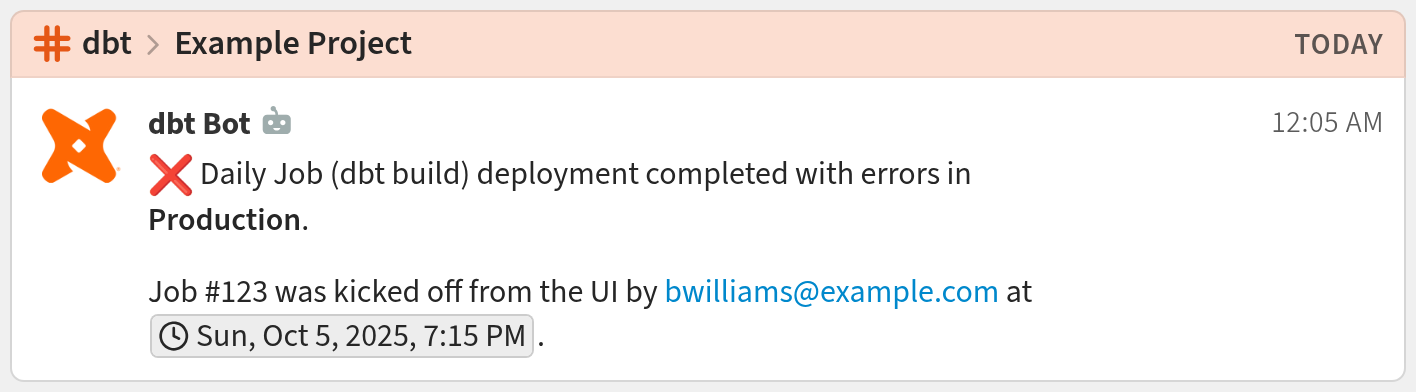
You're done! Your dbt notifications may look like this:
Filtering incoming events
The dbt integration supports filtering for the following events:
job.run.started, job.run.completed, job.run.errored
Related documentation
Logos are trademarks of their respective owners. None of the integrations on this page are created by, affiliated with, or supported by the companies represented by the logos.