
Zulip Errbot integration
Run your favorite chatbot in Zulip!
-
Install errbot, and follow the instructions to set up a
config.py. -
Clone the Errbot API adapter repository somewhere convenient, and install the requirements listed in
errbot-backend-zulip/requirements.txt. -
Create a bot for Errbot. Make sure that you select Generic bot as the Bot type.
-
Edit your ErrBot's
config.py. Use the following template for a minimal configuration:import logging BACKEND = 'Zulip' BOT_EXTRA_BACKEND_DIR = r'<path/to/errbot-backend-zulip>' BOT_DATA_DIR = r'<path/to/your/errbot/data/directory>' BOT_EXTRA_PLUGIN_DIR = r'<path/to/your/errbot/plugin/directory>' BOT_LOG_FILE = r'<path/to/your/errbot/logfile.log>' BOT_LOG_LEVEL = logging.INFO BOT_IDENTITY = { 'email': '<your-bot@email.address>', 'key': '<api-key-of-your-bot>', 'site': '<your-organization-https-url>' } BOT_ADMINS = ('<your@email.address>',) CHATROOM_PRESENCE = () BOT_PREFIX = '@**<your-bot-name>**'Sections you need to edit are marked with
<>. Replace the<...>placeholders with your own values, removing the<and>brackets.Use the details of the Zulip bot created above for the
BOT_IDENTITYandBOT_PREFIXsections.
ErrBot uses the term "Rooms" for Zulip channels.
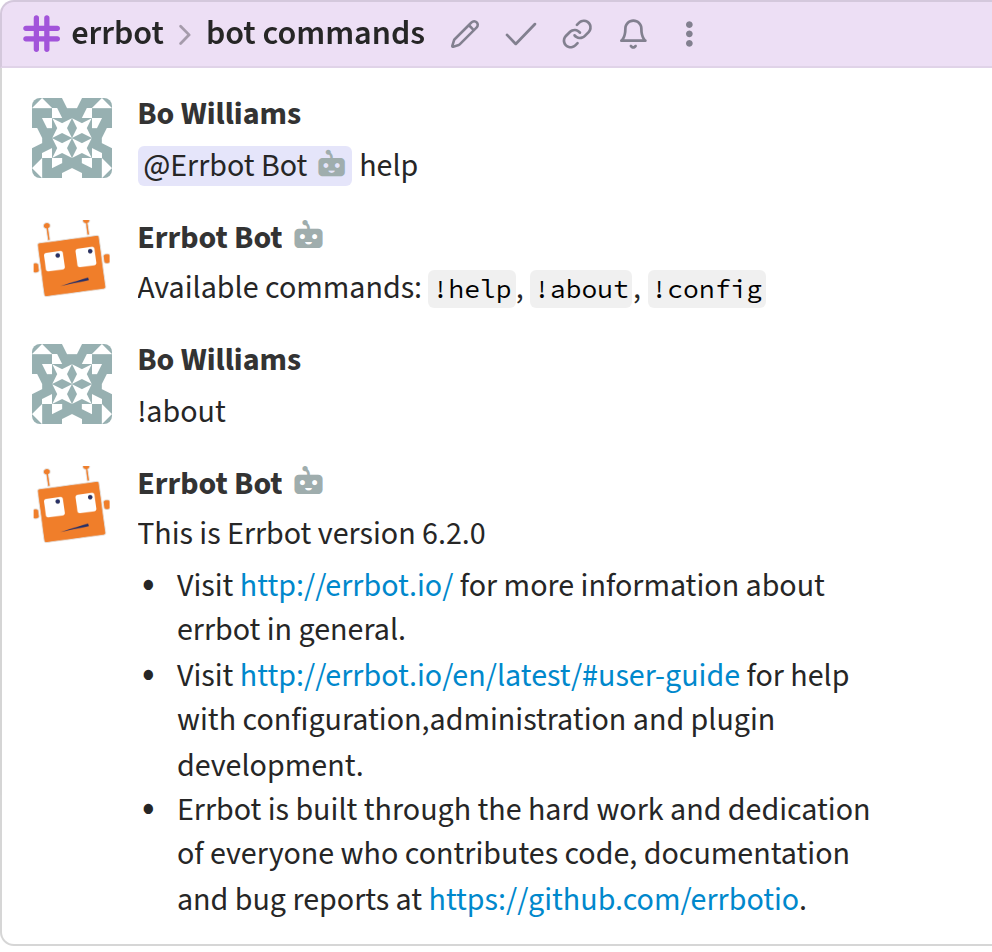
You're done! Your Errbot notifications may look like this:
Related documentation
Errbot is a separate process, not a hosted service supplied by Zulip.
Keep the technical backend name Zulip. Verify adapter, Python, Errbot, and
plugin compatibility. Restrict command administrators and bot read permissions;
subscriptions alone do not restrict public-channel visibility. Configure process
supervision and protect credential files. For SaaS, hybrid, on-premises, and
carrier deployments, agree network access and separate customer runtimes.
Bot API credentials are separate from BYOK encryption keys. Delivery and support
are governed by your commercial agreement.
Logos are trademarks of their respective owners. None of the integrations on this page are created by, affiliated with, or supported by the companies represented by the logos.