
Zulip Front integration
Front lets you manage all of your communication channels in one place, and helps your team collaborate around every message. Follow these steps to receive Front notifications without leaving Zulip!
-
Create a bot for Front. Make sure that you select Incoming webhook as the Bot type.
-
Decide where to send Front notifications, and generate the integration URL.
-
Go to the Settings page of your Front organization, and select the App store tab. Search for the Webhooks integration that's published by Front, and enable the app.
-
Select the Rules tab, and add a new shared rule. Set the When and If conditions you would like to be notified about. Set Send to a Webhook as the action, and input the URL generated above in the Target Webhook field. Click Save.
-
Add a new linkifier in your Zulip organization. Set the pattern to
cnv_(?P<id>[0-9a-z]+)and the URL template tohttps://app.frontapp.com/open/cnv_{id}. This step maps Front conversations to topics in Zulip.
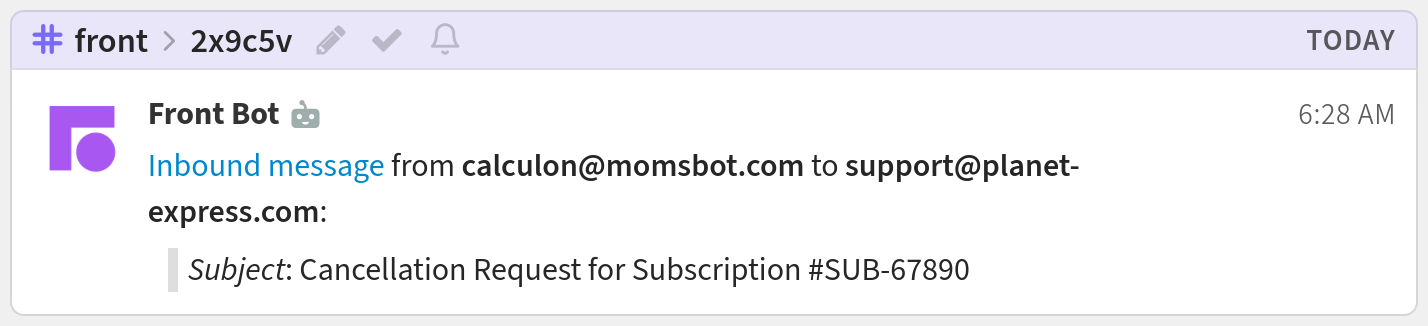
You're done! Your Front notifications may look like this:
Filtering incoming events
The Front integration supports filtering for the following events:
inbound, outbound, out_reply, comment, mention, assign, unassign, archive, reopen, trash, restore, tag, untag
Related documentation
The receiver selects events from JSON type: inbound, outbound, out_reply,
comment, mention, assign, unassign, archive, reopen, trash,
restore, tag, untag. These values are used by only_events and
exclude_events, including wildcards. Unknown types return
Unknown webhook request. Topics come from conversation.id; the linkifier
only makes the ID clickable, it does not create or assign the webhook topic.
Incoming/outgoing message notifications use target.data.id,
conversation.recipient.handle, source.data[0].address,
conversation.subject to show addresses and subject, not the whole email body.
Comments/mentions copy target.data.body; assignment uses participant names,
rule sources use source._meta.type, and tags use target.data.name.
An arbitrary application request or other API version is not automatically
compatible with this source/target/conversation event structure.
Use separate bots and webhook URLs for different customers. The URL contains
api_key; keep it out of public logs. For SaaS, hybrid, on-premises and
telecom-operated deployments, the hosted sender needs HTTPS access to the
organization. Coordinate routing with the operator. Notifications may copy
customer addresses, subjects or internal notes: review channel readership.
Bot credentials are separate from BYOK encryption keys. This receiver does not
independently verify a sender signature or deduplicate event IDs; repeated
requests may repeat messages. Notifications do not relocate the provider's
support data processing/storage to your own server.
Logos are trademarks of their respective owners. None of the integrations on this page are created by, affiliated with, or supported by the companies represented by the logos.