
Zulip New Relic integration
Get Zulip notification for New Relic incidents.
-
Create a bot for New Relic. Make sure that you select Incoming webhook as the Bot type.
-
Decide where to send New Relic notifications, and generate the integration URL.
-
In New Relic, go to the Alerts menu, and select Destinations. Choose Webhook in the Add a destination section.
-
Set a Webhook name, such as
Zulip. Set the Endpoint URL to the URL generated above. Click Save destination. -
In the Alerts menu, select Workflows. Click on + Add a Workflow.
-
Set your workflow name, and filter the trigger conditions. In the Notify section, choose Webhook. In the Edit notification message menu, select the destination for Zulip created above.
-
In the Payload section, you can configure the payload for this workflow. The default payload template is sufficient to get the integration working, but using the message template below will enable the integration to notify you of any acknowledged New Relic incidents. To include additional custom fields, refer to configuration options:
{ "id": {{ json issueId }}, "issueUrl": {{ json issuePageUrl }}, "title": {{ json annotations.title.[0] }}, "priority": {{ json priority }}, "totalIncidents": {{json totalIncidents}}, "state": {{ json state }}, "createdAt": {{ createdAt }}, "updatedAt": {{ updatedAt }}, "alertPolicyNames": {{ json accumulations.policyName }}, "alertConditionNames": {{ json accumulations.conditionName }}, "owner": {{ json owner }}, "zulipCustomFields": {} } -
Click Send test notification to receive a test notification. Select Save message, and click Activate Workflow.
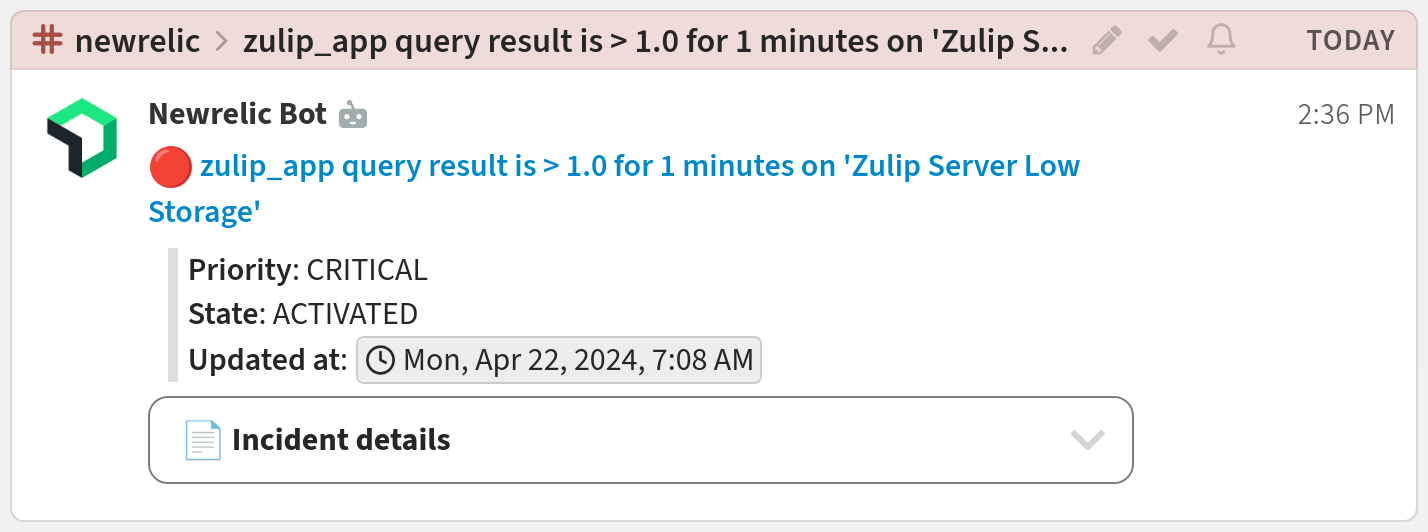
You're done! Your New Relic notifications may look like this:
Configuration options
- With New Relic's custom payload feature, you can include custom
fields in your Zulip notifications by configuring a
zulipCustomFieldsdictionary in your notification payload template. The keys ofzulipCustomFieldswill be displayed in the Zulip notification message, so we recommend that they be human-readable and descriptive. The values of the dictionary can be strings, integers, booleans, or lists of the those same data types.
Filtering incoming events
The New Relic integration supports filtering for the following events:
CREATED, ACTIVATED, CLOSED
Related documentation
The receiver accepts state values CREATED, ACTIVATED, CLOSED and
priority values CRITICAL, HIGH, MEDIUM, LOW. createdAt and
updatedAt are integer Unix timestamps in milliseconds; totalIncidents is
an integer, policy/condition names are string lists. A nonempty owner other
than N/A adds Acknowledged by; acknowledgement is not a distinct accepted
state. only_events and exclude_events filter complete payloads using these
state values. Missing expected fields instead produce a warning in
New Relic incident alerts, return success and bypass event filters because
that path has no event type. Preview the rendered JSON and confirm the channel
message, not just HTTP success. Configuring notifications does not move
New Relic monitoring processing onto your own server.
Custom fields also support numbers, boolean, null and lists of those values;
nested objects/lists are displayed as unsupported data types.
Use separate bots and webhook URLs for each customer's organization. The URL
contains the bot's api_key; keep it out of public logs. For SaaS, hybrid,
on-premises and telecom-operated deployments, the sender needs HTTPS access
to the organization's address. Coordinate routing with the operator.
These bot credentials are separate from BYOK encryption keys. Review channel
readership before copying monitoring details or log entries into messages.
The receiver does not independently verify a sender signature or deduplicate
event IDs. Repeat delivery can produce repeat messages.
Logos are trademarks of their respective owners. None of the integrations on this page are created by, affiliated with, or supported by the companies represented by the logos.