
Zulip Notion integration
Get Zulip notifications for your Notion pages and databases via Zapier!
-
Create a bot for Notion. Make sure that you select Incoming webhook as the Bot type.
-
Continue with step 3 of the Zapier documentation to finish integrating Zulip with Notion.
You can repeat the above process and create Zaps for different projects and/or different kinds of Notion events that you'd like to be notified about in Zulip.
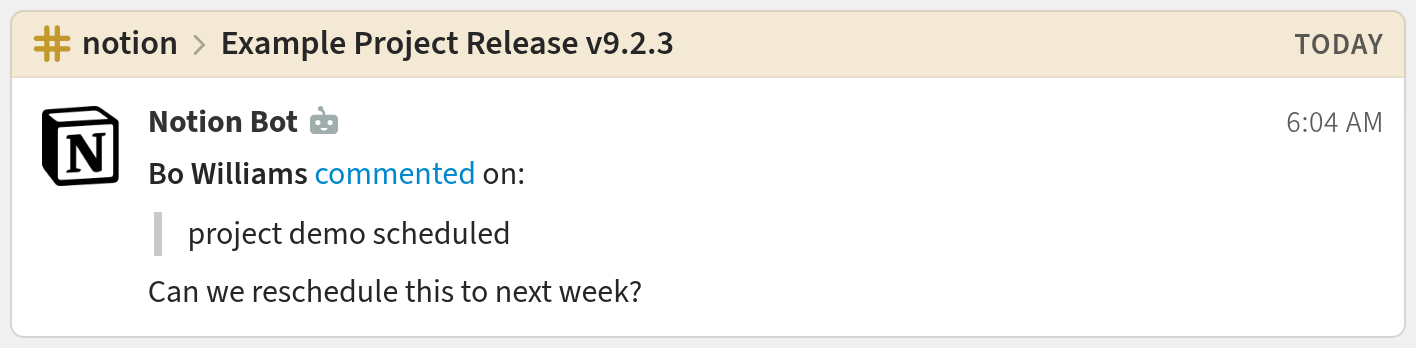
You're done! Your Notion notifications may look like this:
Grant the Zapier connection explicit access to the selected Notion pages or databases; new pages may require additional grants. The external action retains the technical name Zulip; enter your own organization URL. Configure page selection and triggers in Notion/Zapier. This is notification delivery, not full Notion synchronization. Zapier receives the allowed source data and bot API key. Disabling a Zap does not delete messages already sent to the destination.
For SaaS, hybrid, on-premises, and carrier deployments, agree connector hosting, network access, retention, and data deletion responsibilities. Separate customer connections and credentials. API credentials are separate from BYOK encryption keys. Delivery and support of Zulip are governed by your commercial agreement with the operator.
Logos are trademarks of their respective owners. None of the integrations on this page are created by, affiliated with, or supported by the companies represented by the logos.