
Zulip Zendesk integration
Use a trigger-connected webhook; legacy URL targets are deprecated.
- Create a bot with channel access in your organization.
- In Admin Center > Apps and integrations > Actions and webhooks > Webhooks, create a Trigger or automation webhook.
- Use your organization endpoint
/api/v1/external/zendesk, method POST, format Form encoded, and Basic authentication with the bot email and API key. Setstreamto the destination channel. - In Objects and rules > Business rules > Triggers, configure conditions
and Notify by > Active webhook. Supply string parameters:
ticket_id({{ ticket.id }}),ticket_title({{ ticket.title }}), andmessage. Use parameter fields for encoding; do not concatenate raw titles into URLs. - Verify a ticket update and its channel message before disabling old targets.
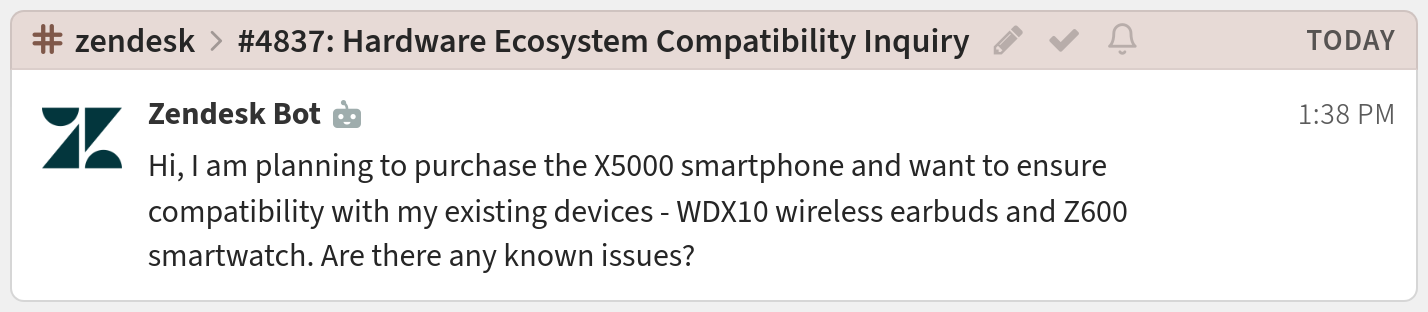
The topic is #<ID>: <title>, truncated to 60 characters. Trigger message text
is passed through. Arbitrary Zendesk event JSON is not compatible.
only_events and exclude_events do not filter events; use trigger conditions.
Zendesk signature secrets are separate from the bot API key; signatures are not
validated by this receiver.
Related documentation
Logos are trademarks of their respective owners. None of the integrations on this page are created by, affiliated with, or supported by the companies represented by the logos.