
Zulip Papertrail integration
Get Zulip notifications for your Papertrail logs!
-
Create a bot for Papertrail. Make sure that you select Incoming webhook as the Bot type.
-
Decide where to send Papertrail notifications, and generate the integration URL.
-
On your Papertrail dashboard, search for the logs you'd like to set up alerts for, and click on Save Search.
-
Provide a name for the search, and click Save & Setup an Alert.
-
Under Create an alert, click on Webhook.
-
Select options under Alert Conditions as appropriate. Set URL to the URL generated above, and click Create Alert.
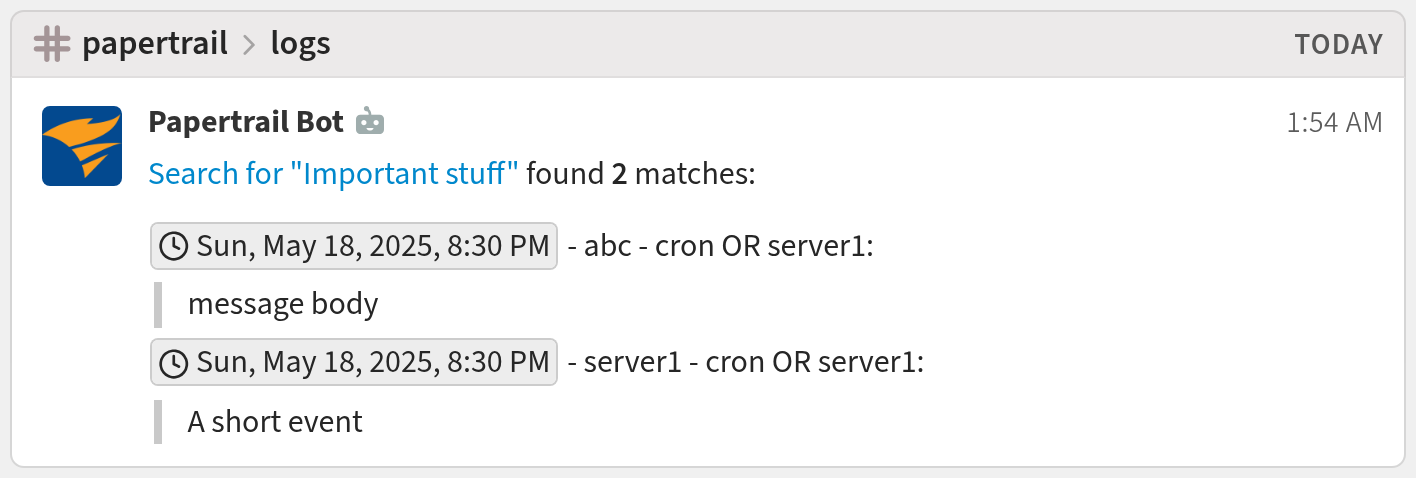
You're done! Your Papertrail notifications may look like this:
Related documentation
Disable Send only counts: count-only callbacks omit events, which this
receiver requires. Papertrail sends application/x-www-form-urlencoded with
JSON in the payload form field, not an arbitrary JSON request body.
The receiver reads saved_search.name, saved_search.html_search_url,
saved_search.query and events, whose entries contain received_at,
source_name, message. Its default topic is logs. It reports the array's
length, includes the first four events and adds See more starting at four.
Missing events returns Events key is missing from payload.
only_events and exclude_events do not select log types: no event type is
passed to the shared sender. Configure searches and conditions in Papertrail.
Its hosted sender cannot reach a private LAN address without an accessible
route; connecting notifications does not move Papertrail log storage on-premises.
Use separate bots and webhook URLs for each customer's organization. The URL
contains the bot's api_key; keep it out of public logs. For SaaS, hybrid,
on-premises and telecom-operated deployments, the sender needs HTTPS access
to the organization's address. Coordinate routing with the operator.
These bot credentials are separate from BYOK encryption keys. Review channel
readership before copying monitoring details or log entries into messages.
The receiver does not independently verify a sender signature or deduplicate
event IDs. Repeat delivery can produce repeat messages.
Logos are trademarks of their respective owners. None of the integrations on this page are created by, affiliated with, or supported by the companies represented by the logos.