
Zulip Raygun integration
Get Zulip notifications for your Raygun events!
-
Create a bot for Raygun. Make sure that you select Incoming webhook as the Bot type.
-
Decide where to send Raygun notifications, and generate the integration URL.
-
Go to your Raygun dashboard, and click on Integrations. Click on Webhook, and click on the Setup tab.
-
Set Url to the URL generated above. Check the Enabled checkbox, and click Save Changes.
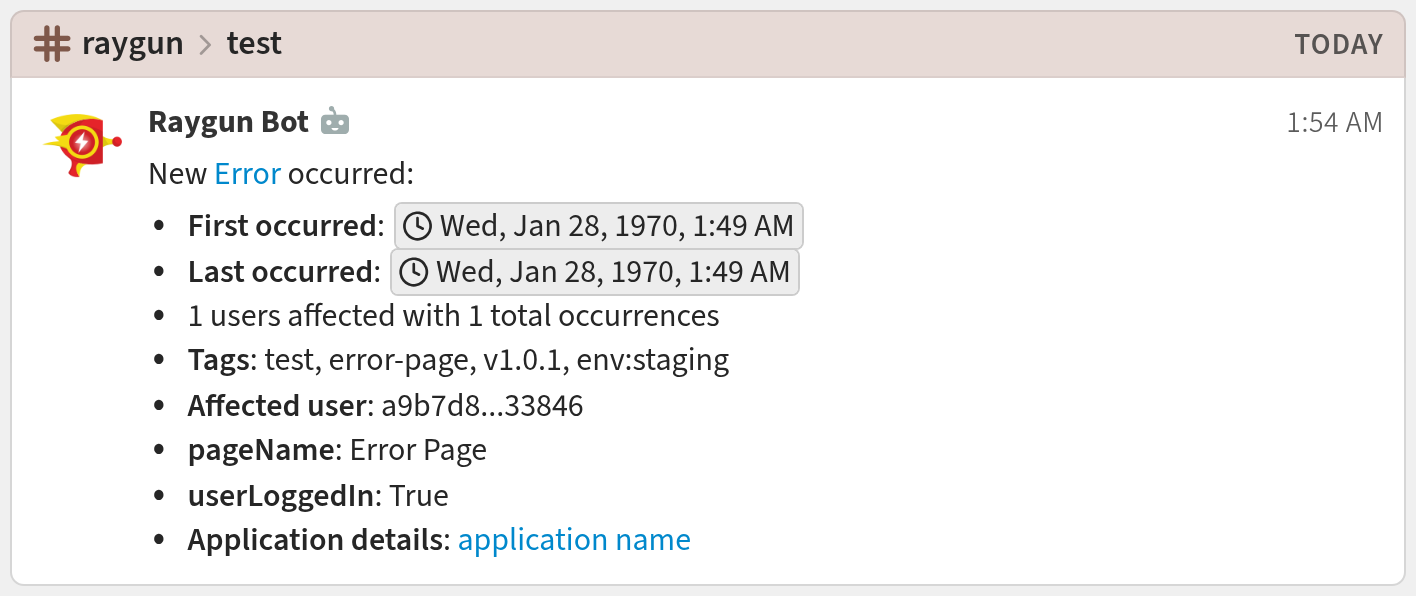
You're done! Your Raygun notifications may look like this:
Filtering incoming events
The Raygun integration supports filtering for the following events:
error_notification, error_activity
Related documentation
URL filters only_events and exclude_events match event: error_notification or error_activity,
not eventType. Supported notification types are NewErrorOccurred,
ErrorReoccurred and types containing FollowUp, including
OneMinuteFollowUp and HourlyFollowUp. Activity types are StatusChanged,
AssignedToUser, CommentAdded. Unknown types produce no message; HTTP
success alone does not prove publication. The current default topic is test;
set your intended topic in the generated URL.
JSON includes error.url, application.name, application.url. Notifications
use ISO strings firstOccurredOn, lastOccurredOn, string message and
integer usersAffected, totalOccurrences; new/reoccurring errors also use
error.instance fields tags, affectedUser, customData. Activities use
ISO activityDate, user, and status, assignedTo or comment.
Tags/custom data are copied; shortening an affected user's UUID is not an
anonymization guarantee. The hosted sender needs an accessible destination;
notifications do not move Raygun processing to your own server.
Use your organization's domain and separate bots/URLs for different customers.
The URL contains the bot's api_key; keep it out of public logs. Review channel
readership before copying error details. This receiver does not independently
verify a sender signature or deduplicate event IDs. Bot credentials are
separate from BYOK encryption keys. For SaaS, hybrid, on-premises and
telecom-operated deployments, the sender needs HTTPS access to the organization.
Coordinate routing with the operator and separately establish where the error
tracking provider stores its data.
The error.instance fields tags, affectedUser, customData may be null; their message sections are then omitted.
Logos are trademarks of their respective owners. None of the integrations on this page are created by, affiliated with, or supported by the companies represented by the logos.